
Cron Triggers
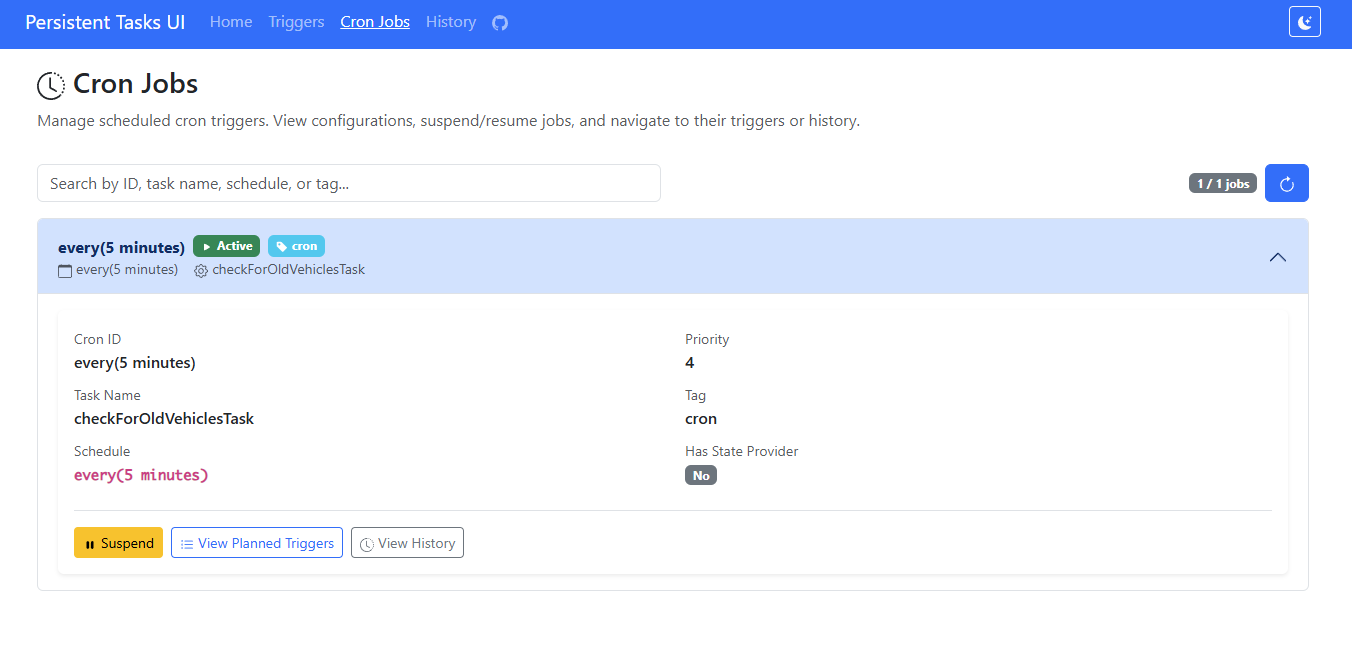
Spring Persistent Tasks supports scheduled recurring triggers using cron expressions or fixed intervals. Cron triggers are automatically recreated after execution and survive application restarts.
Overview
Cron triggers are registered schedules that automatically create trigger instances at specified intervals. The framework ensures that:
- Only one trigger instance exists per cron trigger across all nodes
- Triggers are automatically recreated after successful execution
- Schedules survive application restarts
- Works correctly in multi-node deployments
Registering a Cron Trigger
Use the fluent builder API via TaskId.newCron() to create cron triggers. Register them using TriggerService.register().
Option 1: Using @CronTrigger Annotation (Simplest)
Use the @CronTrigger annotation on your @Component task class for automatic registration:
@Component(DailyCleanupTask.NAME)
@CronTrigger(id = "daily-cleanup-cron", cron = "0 0 2 * * *")
@RequiredArgsConstructor
@Slf4j
public class DailyCleanupTask implements PersistentTask<Void> {

    public static final String NAME = "daily-cleanup";
    public static final TaskId<Void> ID = TaskId.of(NAME);

    private final DataService dataService;

    @Override
    public void accept(Void state) {
        log.info("Running daily cleanup");
        dataService.cleanupOldData();
    }
}Option 2: Manual Registration with @PostConstruct
If you need more control, register the cron trigger programmatically:
@Component(DailyCleanupTask.NAME)
@RequiredArgsConstructor
@Slf4j
public class DailyCleanupTask implements PersistentTask<Void> {

    public static final String NAME = "daily-cleanup";
    public static final TaskId<Void> ID = TaskId.of(NAME);

    private final TriggerService triggerService;
    private final DataService dataService;

    @PostConstruct
    public void registerCronTrigger() {
        triggerService.register(
            ID.newCron()
                .id("daily-cleanup-cron")
                .cron("0 0 2 * * *")  // Every day at 2:00 AM UTC
                .build()
        );
    }

    @Override
    public void accept(Void state) {
        log.info("Running daily cleanup");
        dataService.cleanupOldData();
    }
}Note: The
@CronTriggerannotation automatically registers the cron trigger when the application starts. You don't need to injectTriggerServiceor use@PostConstructwhen using the annotation.
Cron Trigger ID
Important: Consider to specify a unique ID for your cron triggers using .id("unique-id"). This ID is used to:
- Identify the cron trigger in the repository
- Create trigger instances in the database
- Prevent duplicate registrations e.g. during refactorings or cron changes
If you don't specify an ID, it defaults to schedule.description(), which may not be unique or meaningful.
// Good - explicit ID
dailyCleanupTask.newCron()
    .id("daily-cleanup-cron")
    .cron("0 0 2 * * *")
    .build();

// Avoid - ID will be auto-generated from schedule
dailyCleanupTask.newCron()
    .cron("0 0 2 * * *")
.build();Cron Expression Format
Cron expressions use 6 fields (second minute hour day month weekday):
 ┌───────────── second (0-59)
 │ ┌───────────── minute (0-59)
 │ │ ┌───────────── hour (0-23)
 │ │ │ ┌───────────── day of month (1-31)
 │ │ │ │ ┌───────────── month (1-12 or JAN-DEC)
 │ │ │ │ │ ┌───────────── day of week (0-7 or SUN-SAT, 0 and 7 = Sunday)
 │ │ │ │ │ │
* * * * * *Common Examples
// Every minute
.cron("0 * * * * *")

// Every 15 minutes
.cron("0 */15 * * * *")

// Every hour at minute 30
.cron("0 30 * * * *")

// Every day at midnight
.cron("0 0 0 * * *")

// Every Monday at 9:00 AM
.cron("0 0 9 * * MON")

// First day of every month at 1:00 AM
.cron("0 0 1 1 * *")

// Weekdays at 8:00 AM
.cron("0 0 8 * * MON-FRI")Advanced Features
Custom Tags
Add custom tags to identify triggers:
dailyCleanupTask.newCron()
    .id("daily-cleanup-cron")
    .cron("0 0 2 * * *")
    .tag("maintenance")
.build();Priority
Set the priority of the triggers this cron creates (0-9, higher = picked earlier; the default is 4). Use a high value for time-critical schedules and a low value for background ones so they yield the worker to more important work — see Priority for the full semantics (it orders waiting triggers, it does not preempt a running one).
criticalTask.newCron()
    .id("critical-sync")
    .every(Duration.ofMinutes(5))
    .priority(9)        // ahead of default-priority work
    .build();

// ...or a background maintenance cron that should never delay important tasks:
cleanupTask.newCron()
    .id("nightly-cleanup")
    .cron("0 0 2 * * *")
    .priority(1)        // below the default 4
.build();Dynamic State
Use a state provider for dynamic state generation as soon as a new trigger is registered by the cron:
public record SyncState(OffsetDateTime timestamp) implements Serializable {}

TaskId<SyncState> syncTask = taskService.register("data-sync", (SyncState state) -> {
    log.info("Syncing data, last timestamp: {}", state.timestamp());
    // Perform sync
});

syncTask.newCron()
    .id("data-sync-cron")
    .every(Duration.ofMinutes(30))
    .stateProvider(() -> new SyncState(OffsetDateTime.now()))
.build();Configuration
Configure the polling interval for cron trigger checks:
# Check for missing cron triggers every 60 seconds (default)
spring.persistent-tasks.poll-cron-triggers=60Suspending and Resuming Cron Triggers
You can suspend and resume cron triggers at runtime:
@Service
@RequiredArgsConstructor
public class CronManagementService {

    private final TriggerService triggerService;

    public void suspendDailyCleanup() {
        var key = TriggerKey.of("daily-cleanup-cron", "daily-cleanup");
        triggerService.suspendCron(key);
    }

    public void resumeDailyCleanup() {
        var key = TriggerKey.of("daily-cleanup-cron", "daily-cleanup");
        triggerService.resumeCron(key);
    }
}Migration from Spring @Scheduled
If you're migrating from Spring's @Scheduled annotation, here's how to convert your code:
Before (Spring @Scheduled)
@Component
public class ScheduledTasks {

    private final DataService dataService;

    @Scheduled(cron = "0 0 2 * * *")
    public void dailyCleanup() {
        // cleanup logic - will be executed on each node in the cluster
        log.info("Running daily cleanup");
        dataService.cleanup();
    }
}After (Spring Persistent Tasks) - Using @Component
@Component(DailyCleanupTask.NAME)
@RequiredArgsConstructor
@Slf4j
public class DailyCleanupTask implements PersistentTask<Void> {

    public static final String NAME = "daily-cleanup";
    public static final TaskId<Void> ID = TaskId.of(NAME);

    private final TriggerService triggerService;
    private final DataService dataService;

    @PostConstruct
    public void registerCronTrigger() {
        triggerService.register(
            ID.newCron()
                .id("daily-cleanup-cron")
                .cron("0 0 2 * * *")
                .build()
        );
    }

    @Override
    public void accept(Void state) {
        // cleanup logic - will run only on one node in the cluster
        log.info("Running daily cleanup");
        dataService.cleanup();
    }
}Key Differences
| Feature | Spring @Scheduled | Spring Persistent Tasks |
|---|---|---|
| Persistence | No | Yes |
| Cluster-safe | No | Yes |
| Execution history | No | Yes |
| State between runs | Manual | Built-in |
| Runtime control | Limited | Full (suspend/resume) |
| Retry on failure | Manual | Automatic |
| Requires database | No | Yes |